Tuesday, August 24, 2010

The Principles of Beautiful Web Design - Book Review

The Principles of Beautiful Web DesignTired of making web sites that work absolutely perfectly but just don't look nice?
If so, then The Principles of Beautiful Web Design is for you. A simple, easy-to-follow guide, illustrated with plenty of full-color examples, this book will lead you through the process of creating great designs from start to finish. Good design principles are not rocket science, and using the information contained in this book will help you create stunning web sites.

   Understand the design process, from discovery to implementation Understand what makes "good design" Developing pleasing layouts using grids, the rule of thirds, balance and symmetry Use color effectively, develop color schemes and create a palette Use textures, lines, points, shapes, volumes and depth Learn how good typography can make ordinary designs look great Effective imagery: choosing, editing and placing images And much more
   
   Throughout the book, you'll follow an example design, from concept to completion, learning along the way.

   Having "stumbled" into web design almost ten years ago, with no real visual design background to speak of, I have over the course of time picked up principals. This was no easy task, and meant trawling countless websites and articles, being intimidated and awed by the breadth of knowledge and theory that is required to even suggest that you have an idea of what visual design is all about. Some of the articles I read required obscene amounts of concentration and application to the task at hand, as well as some difficult and surprising mental leaps. 

This publication could have saved me quite literally weeks and months of stumbling research had I discovered it years ago, and even now is a brilliant refresher for those of us unfortunate enough to have pursued a "proper" degree ;). 

Buy this book: here

Sunday, August 1, 2010

Agile thoughts - What is the ideal Sprint length?

Introduction

Questions regarding Sprint length surface on the forums regularly.
As per usual, the answers one must give always depends on the context and every context is different than the next. So let me start with the context - this is an excerpt of a post on the scrum development group on Yahoo. Incidentally, Yahoo groups is a good place to hang out. You learn a lot from all the questions and the different contexts facing teams around the world.


The Context

   A team of 5 members currently working with 10-day sprints. They haven't managed in the previous 5 sprints to have 100% of the User Stories completed. It is typically around 60-70% completeness.
There is proposal to increase the sprint duration to 15 days "because doing review meetings and planning every 10 days is a lot of overhead" according to the team.

My thoughts

   Let me start out by stating some facts ...
The official Scrum sprint length is 30 days. However I don't think (I don't have facts to back me up on this but it's the sense I get from all the communications on all the forums) there are many teams working to 30 days any more.

   Much of the Agile community agrees that shorter Sprints are better. So 2 week Sprints and even 1 week Sprints are becoming more the norm.

Why are shorter Sprints better?

   1. Well they have learned from the Lean folks that shorter Sprints means less work-in-progress which means shorter cycle times and overall less waste.


 2. Additionally, shorter Sprints tends to stress your method, revealing any flaws. Like no automated build method, automated check harnesses our unit check frameworks. Fixing these flaws has a twist to provide leaps in productivity gains for your organization.


 So assuming you buy the argument that shorter Sprints are better. My preliminary fast answer to the query is don't try to lengthen the Dash. try to figure out why you are only hitting 60% - 70% of your originally committed goals.


 Incidentally, 60% - 70% may not be that bad, after all you have a team that is currently demonstrating a consistent output Dash after Dash.
So that leads me to think that either the story point estimation is not consistent, or the team is over-committing. So I would recommend that they do the following.
Try to evaluate what is going on in the retrospective. Let team members speak freely about their thoughts on the matter.


 I would definitely spend a small little bit of time re-assessing the size of a few done items i.e. if the story was 10 points originally, what would they estimate the size now, after the fact. Re-assessing the relative size may well fix the issue.


 Some folks, most notably Ron Jefferies, would argue why do you need to get your estimation down pat. Well in my view for one, predictability goes a long way to help remove team stress. So its great for a team to say they can commit to say 100 points and deliver between 90 and 110 each Dash. The business will love you for this.


 Whats nice about this issue in and of itself is that Scrum is doing what it is supposed to do; surface issues for the team to resolve. And if the team feels that going to 15 day Sprints is the right thing to do, so be it - it might well be. But I would try to first figure out why 2 weeks is not cutting it. Lots of teams make it work so it ought to be doable.


 Hope this helps if you are in the same boat. If not at least if it provides food for thought!
View the Original article

Guide to unobtrusive Javascript with Rails 3

sanjuanoil.pngOne of the big surprises and accomplishments is the fact that Unobtrusive Javascript made it into Rails 3. At first, we thought UJS wasn’t going to be included in Rails 3. Well, just before the first beta came out, the community responded well and a bunch of enthusiastic developers finished up one of the most wanted feature in Rails 3.
   Rails has always been about staying on the cutting edge and Rails 3 is no surprise, UJS implementation in Rails 3 takes benefit of the new HTML5 data-*@ attributes. So Rails doesn’t spit out Prototype-based Javascript inline (the old helpers are still here). Rather, the helpers just define an appropriate data attribute in the tag, and that’s where Javascript comes in.

   This literally means you can pick the data attributes in any Javascript framework and write generic code to support Ajax implementation of any kind. As you can imagine, this can be a highly flexible approach for demanding applications. But there’s more, the generic Prototype implementation is included with Rails 3 and the jQuery version is maintained officially here.
Let’s see how easy it is to swap jQuery in Rails 3. In the root of a Rails 3 application, run:

curl -L http://code.jquery.com/jquery-1.4.2.min.js 
> public/javascripts/jquery.js 
curl -L http://github.com/rails/jquery-ujs/raw/master/src/rails.js 
> public/javascripts/rails.js

   Here’s an initializer I got to know from Yehuda that you can define in config/initializers so javascript_include_tag :defaults uses jQuery instead of Prototype.

module ActionView::Helpers::AssetTagHelper
remove_const :JAVASCRIPT_DEFAULT_SOURCES JAVASCRIPT_DEFAULT_SOURCES = %w(jquery.js rails.js) reset_javascript_include_defaultend


   With that set, Rails is now unaware of Prototype, all of the helpers with :remote => true will be grabbed by rails.js and worked through jQuery. You might also want to remove the Prototype libraries inside public/javascripts if you’re not going to use them.

   As you can see, UJS in Rails 3 is pretty easy. Though there is a bit of a configuration to be done if you’re going against the default option in Rails, it’s far easier to work with than in the previous versions.

View the original article

Netzke: Rich Internet Apps with Ext JS and Rails

netzke.pngExt JS is a cross-browser JavaScript library for building rich internet applications. It provides an extended set of powerful, feature-rich widgets that can be used as building blocks for AJAX-driven GUI of almost unlimited complexity. Netzke is a framework that provides a unified way to build clean, reusable and maintainable back-end code for an Ext JS app in Rails.


   A nice example of a Ext JS widget that depends heavily on communication is a grid panel. It provides a convenient GUI for multi-line CRUD operations, as well as for the searching, filtering, and pagination of the information. Configuring an Ext JS grid panel in JavaScript will take some time even if you’re an experienced Ext JS developer - it is tedious work! How about using lots of grid panels (normally bound to different database tables) all throughout your application? You soon recognize, that not only your JavaScript code for those grid has to become reusable in some way, but also the server-side code (that responds to all the grid panel’s AJAX calls), will grow quickly in a not-so-DRY manner.


 This is where Netzke shines. It abstracts both client- and server-side code in to parts. By definition, parts are reusable, isolated and configurable pieces of code with a well-defined functionality. A Netzke part (a “widget”) is a Ruby class that “knows” how to build and instantiate its JavaScript part (used in a browser), as well as how to reply to AJAX calls coming back to the server part. All communication – while being done over the Web – happens “within” the part. Would you like to put several grid panels on the same web-page? Or possibly you need to dynamically load another grid in a modal window? While sharing the code (both JavaScript and Ruby), each of the grids will talk to its own instance, managing a separate ActiveRecord model if needed. See it in action here.


 Netzke GridPanel widget is one example of what can be done with the Netzke framework. Its philosophy is the following: generate a widget one time (you’ll need Ext JS knowledge for that, of coursework), and then reuse it all over again (or share it with the others), without the necessity to write JavaScript anymore. Besides, Netzke parts are basically extendible, use OOP: inheriting from Netzke::GridPanel provides for automatic prototype-based “inheritance” on the JavaScript level, ! Combining several widgets in to a compound widget is also no issue.


 The netzke-basepack project contains a set of pre-built Netzke widgets that can be used as basis for your RIA. And in case you like to know more about different aspects of Netzke, browse through a variety of tutorials on the WriteLessCode blog

View the original article

Is it good to be opinioned software (like Rails) ?

   Ruby on Rails, by its own admission, is an opinionated framework. From day one it has positioned itself as the Kryptonite to enterprise software, providing an easy to use, rapid development framework. The infamous 15 minute blog video set a tone which has continued through to this day: if it's not quick to build and in Ruby, we're not interested.

   Rails takes an extreme viewpoint, the polar opposite of the XML heavy, configuration tangled mess of traditional enterprise software. This viewpoint is necessary---without it we have no alternative---but that doesn't mean it is the best way to build applications. In their book "First, Break All The Rules", Marcus Buckingham and Curt Coffman explain that the the common method of selecting top managers by looking for the opposite of bad managers is wrong. Research showed that this strategy tended to select good managers, but not the best managers. They found that the best and worst managers actually share a lot of the same characteristics! If you want good managers, then study good managers, not bad ones. The same principle applies to software: you won't figure out how to build the best software by studying the worst.

   Studying the bad is exactly the approach the Rails team has taken, though. They have studied enterprise software, and built the opposite. In the process, they have unquestionably made some breakthroughs in how to write quality software fast (that's why we all use it!), but in what ways have they thrown the baby out with the bathwater? What attributes of the worst enterprise software are also found in the best software?
Relational databases have been around for decades, and are solid pieces of infrastructure. They can do some really cool stuff, but Rails considers them no more than a necessary evil. The less the database does, the better. I appreciate the philosophy: if we can move logic from the database in to our ruby application code, that's a win, right? In practice however, this doesn't work. It physically cannot work. In addition, it's actually slower (in terms of development time) and _less_ maintainable to do certain things in ruby rather than the database!

   Relational databases know how to manage relational data. That's what they do, it's in their name. Referential integrity ensures that a child row always has a valid reference to a parent row. If a child has parent_id of 1, then a parent with an id of 1 is guaranteed to exist. Referential integrity has been a solved problem for decades using foreign keys. It is a proven fundamental property of solid applications, yet Rails has no best practice for using them. Rails has tried to reinvent the wheel and do it in ruby (with the has_many :dependent option), but it's half baked and cannot cover even simple edge cases. Try this thought experiment: one of your application servers adds a child row to a parent, while another one deletes that same parent at the same time. How you can prevent the child row from being orphaned? You can't, not without using your database.

   Even something as simple as not null constraints, a fundamental principle of data design, are thrown away in the extreme polarized Rails opinion. You can just use validates_presence_of! Once again nice in theory, but I have yet to see a large evolving Rails application that hadn't had at least one null in its database where it shouldn't have been (subsequently causing errors). Even if I had, it's the cheapest safety net you can buy: all it "costs" you is a :null => false declaration in your migration and you never have to think about it again. No one in your team, not even the new rookie graduate, ever has to think about it again or run the risk of accidentally bypassing validations.

   I'm not faulting the Rails team here. They have taken a hard line position and stuck with it, which is important for our industry. As software professionals though, we have a very different mandate than the Rails team. They are defining and pushing the boundaries of how we build software, where as our job is to find the best compromise of existing technologies to provide business value. This sweet spot will inevitably lie somewhere between extreme opinions.

View the original article

An Introduction to Refinery CMS – A Rails Content Management System

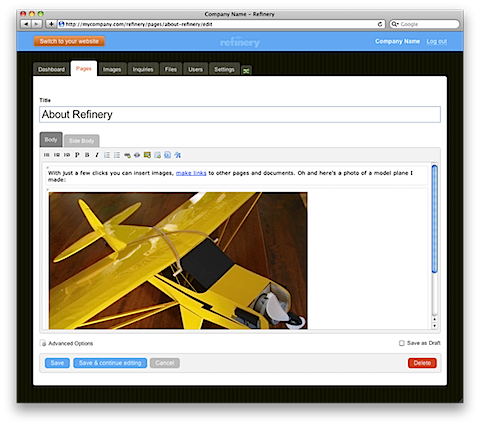
Refinery CMS is an open source Ruby on Rails CMS for small businesses. The project was originally closed source for 4 years at Resolve Digital until it was finally released to the open source community in mid 2009. Refinery focuses on doing things "the Rails way" where possible. This means you don't have to learn too much to start theming it and building your own custom plugins.
refinery-dashboard.png
What it's it good at?
Refinery is great for small business sites where the client needs to be able to update their website themselves without being bombarded with anything too complicated.
Unlike other content managers, Refinery is truly aimed at the end user making it easy for them to pick up and make changes themselves. The UI is clean and simple so the end user feels at ease and hopefully won't bug the developer with questions!
What Features Does It Have?Theming supportEasy to use Rails-like plugin generator and plugin architectureWYSIWYG content editingLocalisation (currently supports 10 langauges)Page managementImage and File managementContact form and inquiry managementSearch Engine OptimisationHow do I install it?
Firstly install the Refinery CMS gem. This gives you a 'refinerycms' command you can run that creates a new Rails project with Refinery CMS hooked into it.
gem install refinerycms
refinerycms path/to/project
Finally change into the project start the web server
cd path/to/project
ruby ./script/server
Visit http://localhost:3000 and set up your first Refinery user.
What's coming up in Refinery CMS
Refinery is gearing up for it's 1.0 release with Rails 3.0 support. There is also a Refinery Day coming up where members of the community will be combining efforts to support Rails 3. Check the Google Groups below for details.
View the original article

Effective Java - Book review

Effective Java (2nd Edition)Java™ the programming language gives you the freedom to develop everything that you might dream of and much more. From simple web sites to enterprise ready back end applications. However, with the great power comes the great responsibility so you might need some expert guidance!
Effective Java
is a book that will provide such guidance and much more! If you are looking for deeper understanding of the Java™ the programming language so that you can write more robust, correct and reusable code this book should be your number 1 choice!


This book teaches you how to:
  • Properly handle generics
  • Design classes 
  • Instantiate just enough objects
  • Avoid the traps and pitfalls of commonly misunderstood subtleties of the language
   After finishing this book you will know when and how to handle generics, enums, annotations, autoboxing, the for-each loop, varargs, concurrency utilities and tons more!

Buy this book: Here